canDO Valve Controller Quick Start
1. Unbox and get the app
Scan the QR code on the controller's label. The page it opens shows your 6-digit pairing code and the download link for the app.
Photograph the label or write the code down. Once installed, the controller is out of sight.
Install Valve Ctrl from that link, or from the App Store or Google Play (iPhone, or Android 11 or later).
2. Install
For full instructions, see the installation section of the Valve Controller User Guide. Everything plugs in, with no cutting or splicing. Work on a cool exhaust.
In the trunk, remove the liners and find an unused grommet leading to the rear under-floor area.
Remove the grommet, feed both controller connectors through it, and reseat it around the cable.
Under the car, unplug the factory 3-pin connector from each exhaust-valve actuator, and plug the controller in between the actuator and the car's harness.
Mount the controller in the trunk near the battery and tidy the harness.
3. Pair
Start the engine, or switch on diagnostics mode so the controller has power: press Start 3 times in quick succession, without your foot on the brake. In diagnostics mode, a battery charger on the car is a good idea.
Open the app and allow the permissions it asks for, one at a time. Bluetooth is required. On Android, a screen first explains what each permission is for.
The valve ring shows SCANNING, then connects. When your phone asks, enter the 6-digit pairing code. Pair from the phone itself, not from CarPlay or Android Auto.
If the app offers a firmware update, install it: tap Update, and keep the engine running (or diagnostics mode on) and the phone near the car until it finishes.
4. Set the valves
Tap a wedge on the valve ring for OEM, 25, 50, 75 or 100% open, or drag the outer dial for any value. The centre shows the valves' actual opening; the grey caret shows what the car is asking for. Each mode is explained in the User Guide.
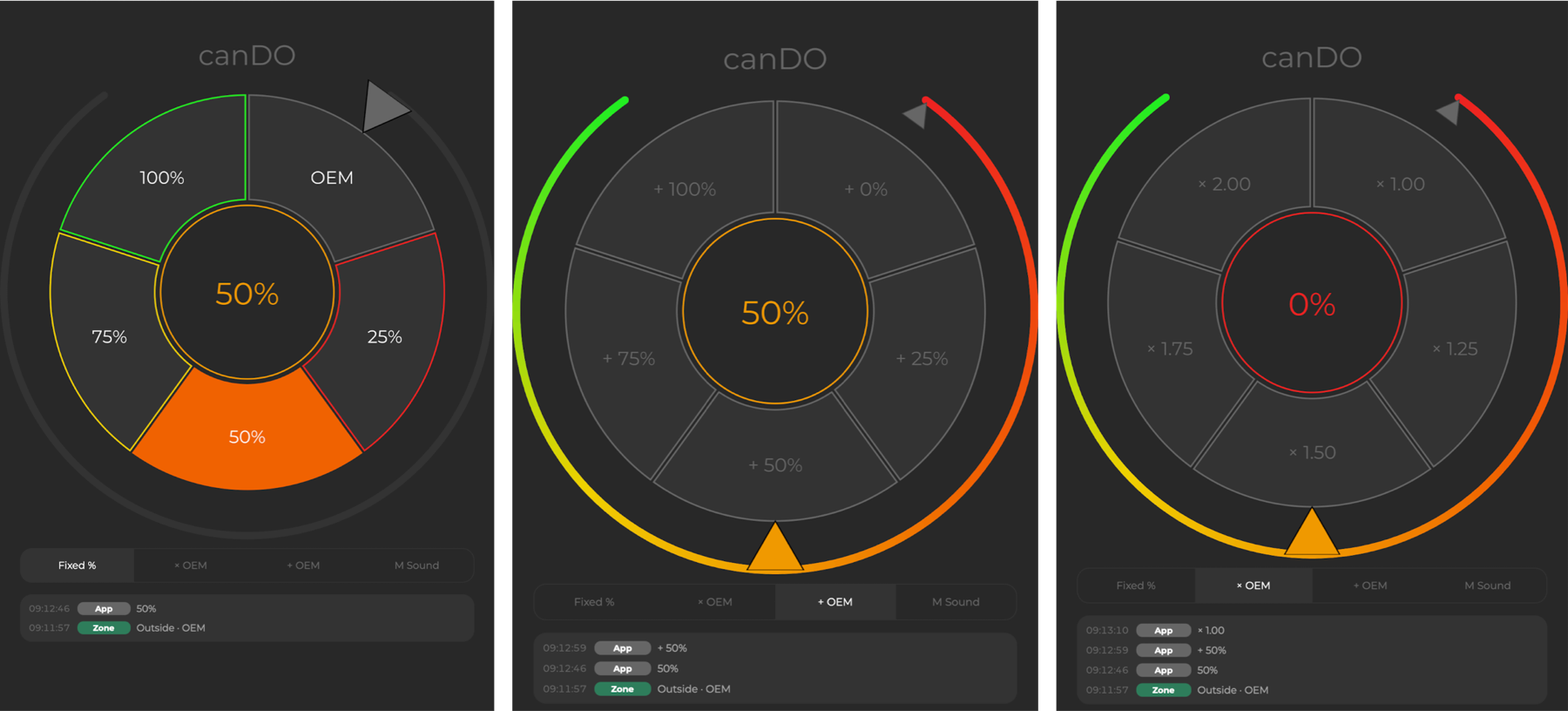
| Mode | What the valves do |
|---|---|
| OEM | Follow the car, as if the controller were not there |
| 25% to 100%, Fixed % | Hold that opening, whatever the car asks |
| × OEM | The car's opening multiplied by a factor, for example 1.25 |
| + OEM | The car's opening plus a fixed amount, for example +20% |
On the G42 the wedges are OEM, 50% and 100%. If the controller loses a signal it depends on, it goes to its safe position (OEM on current controllers) and the app shows OUTPUT LOSS or ECU LOSS: check the connectors at the valve actuators.
5. Go further
Zones: under Settings, tap Add zone. The valves then change by themselves when you arrive at or leave a place, for example OEM at home and 100% at the track. Allow location Always.
Quiet Start: give a zone quiet hours, so early starts stay quiet for the neighbours.
CarPlay and Android Auto: a grid of valve buttons on the car's screen.
iOS widget: the valve ring on your home screen.
canDO+: set the valves from M1, M2 or almost any button in the car. See the Bundle Quick Start.
If something is off
| Problem | What to do |
|---|---|
| The ring stays on SCANNING | Start the engine or switch on diagnostics mode, stay near the car and check that Bluetooth is on. Still nothing? Forget ValveCTRL in your phone's Bluetooth settings and pair again |
| Controls are greyed out on a new controller | It may be a diagnostic-only model. Check the licence under Update |
| Zones do not switch | Allow precise location, location Always and notifications. On Android, let the app run in the background |
More information is in the User Guide. For anything else, email [email protected] with the controller ID shown under Update.
Exhaust-valve control may be restricted on public roads; check your local rules. Intended primarily for track or off-road use where permitted.